
Machine embroidery is fun and creative. It lets you add art to clothes, bags, hats, and more. But before your machine can stitch a design, it must read a special type of file. If you pick the wrong file, the design may not open. Or the stitches may look messy.Many new users feel lost when they see many design file types online. Each machine brand can read only some file types. That is why learning about the right Embroidery File Format is very important before you download or buy a design.
In this guide, I will share simple tips that come from real embroidery work. These tips will help you pick the best design file for your machine. You will also learn how to avoid common mistakes.
Why Design Files Matter in Machine Embroidery
Your embroidery machine works like a small computer. It cannot read normal image files like JPG or PNG. Instead, it needs a special design file.
This file tells the machine:
Where to place each stitch
What stitch type to use
What color to stitch next
When to stop or trim thread
Without the correct file, the machine will not know what to do.
Think of it like a recipe. If the recipe is written in a language your machine cannot read, it will not work.
Common Design File Types for Embroidery Machines
Different machines use different design files. Below are some of the most common ones used by home and commercial machines.
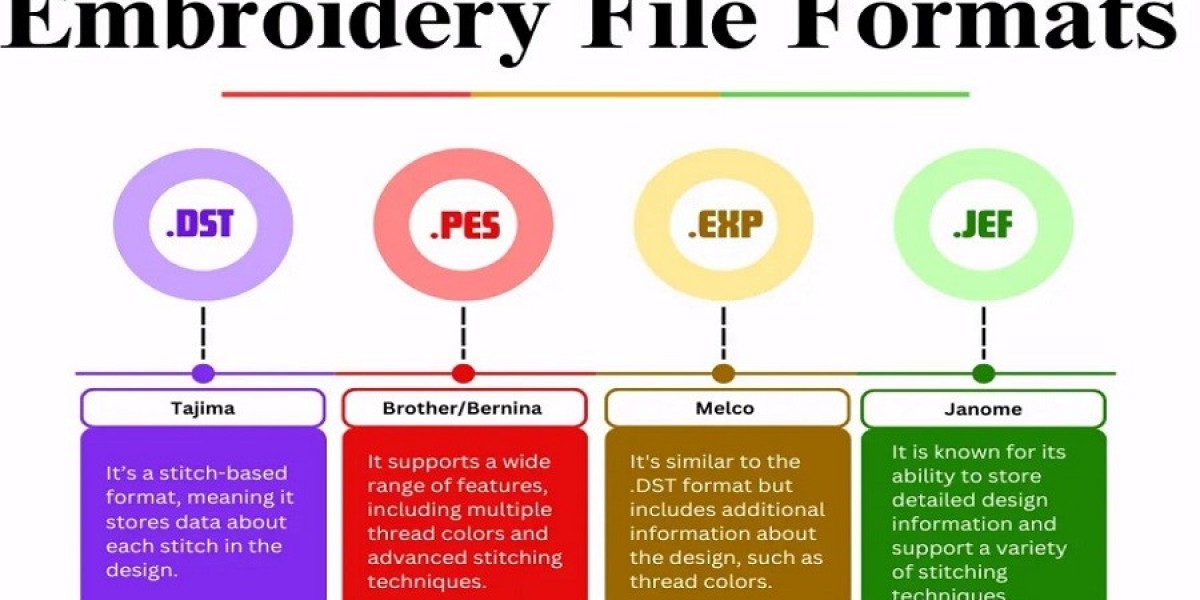
PES
PES files are used by many Brother and Baby Lock machines. They are very common in the embroidery world.
These files store stitch data and color info. Many online design shops offer PES files.
DST
DST is a simple and widely used file type. Many commercial machines use it.
It stores stitch data but not full color details. The machine may ask you to choose colors during setup.
JEF
JEF files are used by Janome embroidery machines.
They store stitch data and thread color info. Many Janome users look for this format when buying designs.
EXP
EXP files are often used by Melco and some Bernina machines.
These files focus mostly on stitch commands.
VP3
VP3 files are used by Husqvarna Viking and Pfaff machines.
They support advanced stitch data and design details.
Step 1: Check Your Machine Manual
The first step is very simple. Look at your embroidery machine manual.
Every manual lists the design files the machine can read.
Some machines support only one type. Others support many.
Write down the supported formats. This small step can save you time and money.
Tip From Experience
I once bought a large design pack online. It looked great. But my machine could not open the files. I later learned the designs were made for another brand.
After that, I always check my machine format first.
Step 2: Know Your Machine Brand
Your machine brand often decides the file type you need.
Here are a few examples.
Brother Machines
Most Brother machines use PES files.
Janome Machines
Janome machines usually read JEF files.
Bernina Machines
Bernina machines often use EXP files.
Husqvarna and Pfaff
These machines often use VP3 files.
Some new machines support more formats. But it is still best to use the native format made for your machine.
Step 3: Look for Multi-Format Design Downloads
Many embroidery websites help users by offering designs in many file types.
When you download the design, you may see a zip folder. Inside it are many formats of the same design.
This is great because you can choose the one that works for your machine.
Why This Is Helpful
It lets one design work for many machines.
You do not need to convert the file yourself.
This saves time and avoids errors.
Step 4: Understand Design Size and Hoop Size
The file type is not the only thing that matters.
Design size must also match your hoop size.
Each embroidery machine has a hoop area. This is the space where the design stitches.
If the design is too large, your machine will not stitch it.
Example
If your hoop size is:
4 x 4 inches
Then the design must be smaller than that.
Always check the design size before downloading.
Step 5: Check Stitch Count
Stitch count tells you how many stitches are in the design.
Large designs have more stitches.
Why this matters:
More stitches take more time
More stitches use more thread
Very large designs may slow some machines
Beginner Tip
Start with designs under 10,000 stitches.
They are quick to test and easy to manage.
Step 6: Use Trusted Design Websites
Not all embroidery designs online are made well.
Poor designs can cause problems such as:
Thread breaks
Uneven stitches
Bad alignment
Always download from trusted websites.
Signs of a Good Design Shop
Look for these things:
Clear product images
Design size info
Stitch count listed
Multiple file formats
Customer reviews
These signs show the seller cares about quality.
Step 7: Learn About File Conversion
Sometimes you may find a design you love, but the file type does not match your machine.
In this case, file conversion can help.
Conversion tools change one design file type into another.
But Be Careful
Conversion does not always work perfectly.
Some stitch data may change. The design may not stitch the same way.
That is why it is always best to download the correct format if possible.
Step 8: Test Designs Before Big Projects
Before you stitch on a shirt or jacket, test the design.
Use scrap fabric first.
This simple step helps you check:
stitch quality
design size
thread color order
My Personal Habit
Every time I buy a new design, I test it first.
This saves fabric and avoids mistakes.
Step 9: Organize Your Design Files
As you collect designs, your computer folder can grow fast.
Good file organization helps you find designs quickly.
Simple Folder Ideas
You can organize by:
design type (flowers, logos, animals)
file format
project type
This keeps your embroidery work smooth and stress free.
Step 10: Keep Your Machine Software Updated
Some modern embroidery machines use firmware updates.
Updates may allow the machine to support more design features.
Check your machine brand website from time to time.
Updating software can improve design reading and stitching quality.
Common Mistakes Beginners Make
Many new users make the same mistakes. Avoiding them will save time.
Downloading the Wrong File
Always confirm your machine format before download.
Ignoring Design Size
Large designs may not fit your hoop.
Using Low-Quality Designs
Cheap or poorly made designs often stitch badly.
Skipping Test Stitches
Testing helps avoid ruined fabric.
Helpful Tools for Embroidery File Management
Some simple tools can help you manage and view your designs.
Embroidery Viewer Software
These programs let you preview designs before stitching.
You can see:
stitch path
design size
color order
USB Design Transfer
Most machines use a USB drive.
You copy the design file to the USB and insert it into the machine.
Make sure the file is placed in the correct folder.
How the Right Design File Improves Stitch Quality
Choosing the correct design file is not just about compatibility.
It also affects stitch quality.
Correct files help with:
smooth stitch flow
correct thread changes
proper design scaling
When the file is made for your machine type, the result looks clean and professional.
Final Thoughts
Choosing the right design file may feel confusing at first. But once you learn the basics, it becomes easy.
Just remember these key steps:
Check your machine manual
Know your supported file type
Download designs from trusted sources
Match the design size to your hoop
Test designs before real projects
With these simple habits, your embroidery work will look better and your machine will run smoothly.
Embroidery is a craft that grows with practice. The more designs you use, the more confident you will become in choosing the right files.
Soon, picking the correct design file will feel natural.
And your projects will look amazing.