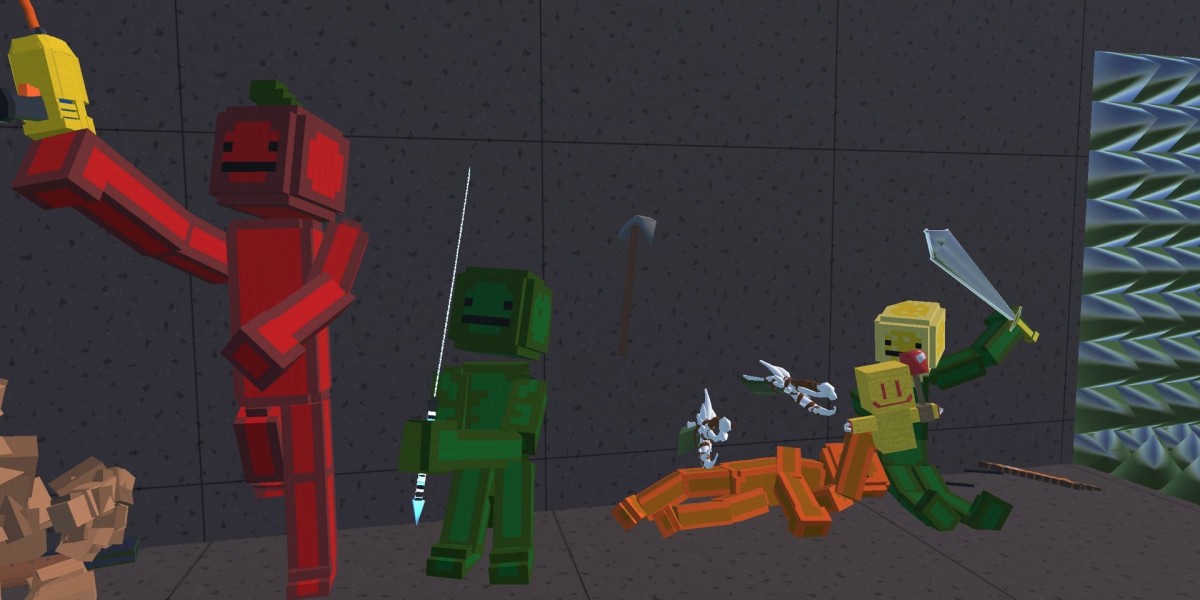

Instead, it relies on the raw power of imagination and the unpredictable nature of physics. Enter Melon Playground , a browser-based action and physics sandbox that has become a staple for players who love to experiment, build, and—occasionally—cause a little bit of digital mayhem.
If you’ve ever spent hours stacking blocks just to see how they fall, or if you enjoy the "what happens if I do this?" style of gaming, then Melon Playground is likely already on your radar. If not, here is a look at what makes this game a unique corner of the internet.
What is Melon Playground?
At its core, Melon Playground is a spiritual successor to the classic ragdoll physics games of the early 2000s. It provides players with a blank canvas (literally, a variety of open maps) and a massive toolbox filled with characters, weapons, machinery, and environmental hazards.
The game doesn't give you a quest log or a final boss. There are no levels to "beat." Instead, the objective is whatever you decide it to be. Whether you want to build a functional elevator, simulate a complex laboratory experiment, or just see how many watermelons can survive a collision with a high-speed vehicle, the game provides the framework for you to do so.
The Two Ways to Play
One of the most interesting aspects of Melon Playground is that it caters to two very distinct types of players. While the mechanics remain the same, the intent behind the playstyle usually falls into one of two categories: The Engineer and The Chaotic Scientist.
1. The Engineer: Building and Mechanics
For the "Engineer," Melon Playground is a puzzle game. This playstyle focuses on the game’s intricate wiring and connection systems. You can link objects together using ropes, steel cables, or motorized pivots.
I’ve seen players create incredible things: fully functional tanks, complex trapdoors, and even multi-stage rockets. For this type of player, the joy comes from the trial and error of making a machine work. There is a profound sense of satisfaction when you spend twenty minutes wiring a series of thrusters and sensors, only to have your creation fly across the screen exactly as planned.
2. The Chaotic Scientist: Physics and Action
On the other side of the spectrum is the "Chaotic Scientist." This is the playstyle most people think of when they first open Melon Playground. This involves placing the iconic fruit-headed ragdolls into various scenarios to see how the physics engine reacts.
The game features an impressive array of tools—from simple melee weapons and firearms to gravity-defying gadgets and explosives. Because the characters have individual limb physics and "health" systems, the interactions are surprisingly detailed. It’s a safe, digital space to explore "what-if" scenarios that would be impossible (and very messy) in real life.
Navigating the Gameplay
Starting your journey in Melon Playground is straightforward, but the depth of the game reveals itself the more you click around.
When you load into a map, you are greeted with a clean sidebar menu. This is your toy box. Items are categorized into several tabs:
Living Beings: The "Melons," "Pumpkins," and "Corn" characters that inhabit your world.
Melee and Firearms: Tools of interaction ranging from swords to futuristic blasters.
Explosives: Everything from small grenades to massive nuclear devices.
Mechanisms: The meat of the game for builders—engines, rotors, and thrusters.
Medical: Syringes that can change the properties of your characters (making them immortal, invisible, or even turning them into skeletons).
The real magic happens when you start using the Context Menu. By right-clicking (or long-pressing) on any object, you can freeze it in mid-air, resize it, or change its layer. Freezing objects is perhaps the most important mechanic, as it allows you to build stable structures that won't collapse under their own weight until you’re ready for the "action" to begin.
Tips for New Players
If you’re just starting out in Melon Playground, the sheer number of options can be overwhelming. Here are a few tips I’ve gathered from my own time in the sandbox:
Master the "Freeze" Tool: If you want to build a house or a vehicle, freeze the main frame first. Once you’ve attached all the wheels, engines, and decorations, you can unfreeze it to see if it holds together.
Experiment with Syringes: Don't just look at the weapons. The medical syringes can completely change how a character interacts with the world. A "Regeneration" syringe can make a character nearly invincible, which is great if you want to test a high-speed vehicle without the driver disappearing on the first bump.
Use the Slow-Motion Feature: Physics can happen fast—sometimes too fast to see. The slow-motion button at the top of the screen is your best friend. It allows you to watch the chain reactions in detail and figure out exactly where a mechanical build went wrong.
Wiring is Key: If you want to make a remote-controlled bomb or a toggleable engine, look into the "Signal" wires. You can connect a button to a thruster, allowing you to trigger your creations with a single keypress rather than clicking on each item individually.
Save Your Creations: Don't let your hard work go to waste. Melon Playground allows you to select a group of objects and save them as a "Template." This means you can build a custom car once and spawn it into any map whenever you want.