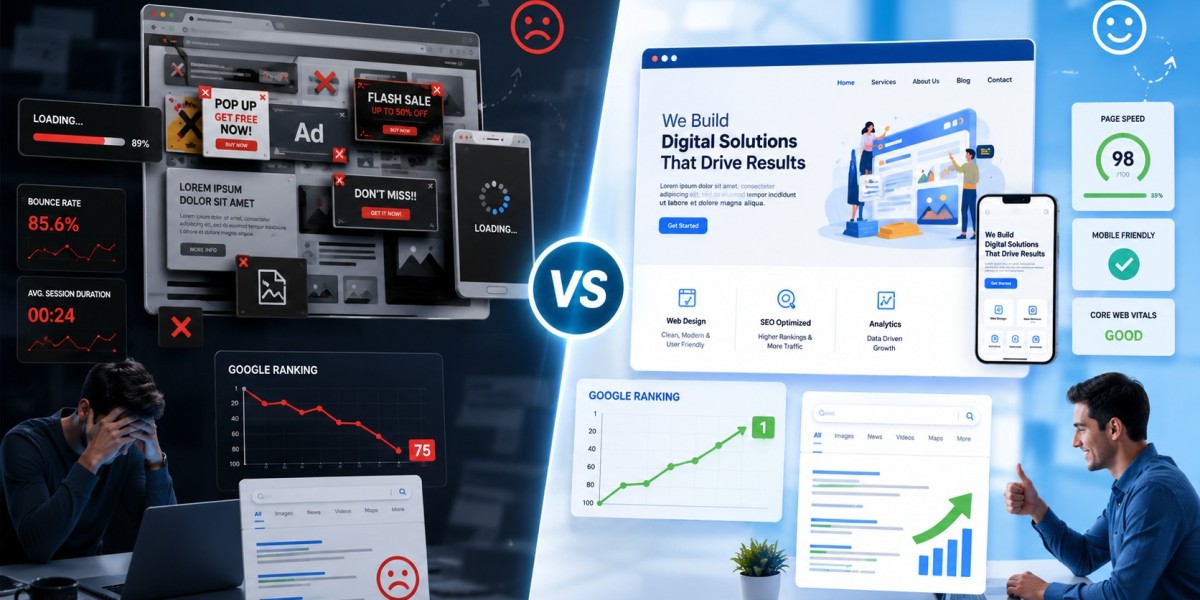

You updated your website, added SEO-optimised content to it, and used various SEO hacks. But your website ranking doesn’t move at all. Sound familiar? Often, the problem is not the content. It’s the website itself. A slow, confusing, or outdated website quietly pushes visitors away, and Google notices that faster than most people think.
If users leave your site within seconds, struggle to use it on mobile, or cannot find the information they need, your rankings can start slipping without warning. That is why web design now plays a much bigger role in SEO than it did a few years ago. A website should not only look good. It should feel smooth, fast, clear, and effortless to use from the moment someone lands on it.
1. Slow Websites Lose Visitors Fast
Nobody likes waiting for a website to load. If your pages take too long, most visitors leave before they even see your content.
Google has openly said page speed matters. In fact, studies show more than half of users leave a website if it takes longer than three seconds to load. Images of large size, bloated themes, spaghetti code, and unnecessary plugins are usually the reason behind slow websites.
A fast loading website keeps visitors engaged, which thus improves your chances of ranking.
2. Mobile-Friendly Design
Most people now browse websites on their phones. That is exactly why Google uses mobile-first indexing.
If your website looks broken on mobile, has tiny text, or forces users to zoom in constantly, people will leave almost immediately. Google sees such behavior as a poor user experience.
A responsive website adjusts to different screen sizes.
3. Confusing Navigation Hurts SEO
Ever visited a website and had no idea where to click next? Most people leave within seconds when that happens.
Your website should guide visitors naturally. Menus should be simple, pages should be straightforward to find, and important information should never feel hidden.
If your website navigation is concise, it helps Google crawl your site. If SEs cannot understand your pages, it will affect your ranking.
4. Bad Layout Pushes Readers Away
People do not read websites word by word anymore. They scan. Lengthy paragraphs, congested sections, odd colors, and poor spacing make content difficult to read.
A simple layout with suitable headings, short paragraphs, and sufficient white space inspires visitors to read the content. The less effort they have to make to read the content, the more they will stay on your website.
5. Missing H1 Tags Confuse Search Engines
Your H1 tag tells Google what the page is about. Without it, you will not be able to rank your website on search engines.
Every page should have one H1 heading at the top. Then, there should be H2 and H3 in the rest of the content. It makes the content readable and helps search engines grasp your page structure.
6. Large Images Slow Everything Down
High-quality visuals definitely look attractive on the website, but such images are often of large size, and it can slow down the website.
Oversized images increase the loading time of the website, particularly on mobile devices. To avoid it, upload the compressed files on the website with the exact ratio and optimized alt text. It improves loading speed and image search visibility on the website.
7. Keyword Stuffing Still Damages Rankings
Some websites still force keywords into every second sentence, thinking it helps rankings. It doesn’t.
Google is much smarter now. Content stuffed with keywords feels unnatural and frustrating to read. Don’t overuse the keywords in the content. Add the keywords naturally.
8. Poor Quality Backlinks Can Backfire
A backlink is helpful for your website, but not all. Links from spammy or irrelevant websites will never let you show in the top SERP results.
There should be only quality backlinks from trusted, relevant, and authoritative third-party websites.
9. Pop-Ups Can Frustrate Users
Pop-ups are everywhere, but too many of them ruin the browsing experience.
If visitors open your website and instantly get blocked by ads or sign-up forms, they often leave right away. Your website should not have any unwanted pop-ups.
If you want to have a pop-up on your site, then it should be plain and accurate.
10. Poor Design Reduces Trust
People judge websites quickly. A fussy design, boring layout, poor fonts, or odd colors can make a business look amateurish.
A well-designed website builds instant trust. Visitors can easily surf the webpages on-site, read the content inside, and contact your business.
That is one reason many businesses now invest in professional web design services in California to improve both user experience and online visibility.
11. Weak Website Structure Creates Problems
Your website structure affects both visitors and search engines.
Pages should have internal links, and all the key pages should be accessible. If there is not internal linking, Google may not crawl your website.
A simple website structure makes navigation effortless and helps search engines comprehend your content better.
Closing Remarks
A website can look attractive on the surface and still struggle badly in search rankings. Slow loading speeds, poor mobile layouts, confusing navigation, cluttered pages, and weak structure quietly affect how users interact with your website. Over time, those problems can push your rankings down and reduce your traffic. The good news is that these issues can be resolved.
If you want to make a responsive website, contact AccessiWise. We offer the best and reliable web design services at competitive rates.
FAQs
1. Can web design affect Google rankings?
Ans: Indeed, it can. If the website has mediocre web design, it can increase bounce rates, slow down loading speed, and create a bad user experience, which may lower rankings as time passes.
2. Why is mobile-friendly design important?
Ans: Because Google prefers mobile-responsive websites. If the website is not working properly on mobile phones, it can affect traffic and ranking.
3. Does website speed really matter?
Ans: It always does. Slow-loading websites frustrate users and force them to leave your website and visit your competitor's site.
4. What is bounce rate?
Ans: Bounce rate is the percentage of visitors who leave your website without clicking on another page.
5. Can poor navigation hurt SEO?
Ans: Yes, poor navigation makes it difficult for visitors and search engines to understand your website.
6. Why are headings important for SEO?
Headings help organise content and tell search engines what your page is about.